Getting Started
Get up and running with SCode in minutes.
Installation
Requirements
- python 3.13 (Scode is made by Python 3.13. But scode can run if python version is above 3.10)
- pip
Install
pip install git+https://github.com/scodehdl/SCodeHDL.git

reinstall
pip install --force-reinstall git+https://github.com/scodehdl/SCodeHDL.git
Verify
scode --version
scode --help
Usage
scode <file.sc>          # generate VHDL (default)
scode -v <file.sc>       # generate Verilog
scode -a <file.sc>       # generate both VHDL and Verilog
scode -c <file.sc>       # print component template
scode -o <outdir> <file.sc>  # specify output directory
SCode Makes HDL Authoring Easy
make counter.sc file and execute scode
N = 8
inport(clk, reset)
inport(enable)
outport(counter_out[N])

with sequence(clk) :
    counter_out <= (0, reset, counter_out + 1, enable)
scode counter.scthen counter.vhd was made.
library ieee;
use ieee.std_logic_1164.all;
use ieee.numeric_std.all;

entity counter is
    port (
        clk                 : in std_logic;
        reset               : in std_logic;
        enable              : in std_logic;
        counter_out         : out std_logic_vector(7 downto 0)
    );
end entity;

architecture arch_counter of counter is
signal counter_out_oi       : std_logic_vector(7 downto 0);

begin

    process(clk)
    begin
        if rising_edge(clk) then
            if reset = '1' then
                counter_out_oi <= (others=>'0');
            elsif enable = '1' then
                counter_out_oi <= std_logic_vector(unsigned(counter_out_oi) + 1);
            end if;
        end if;
    end process;
    counter_out <= counter_out_oi;

end architecture;
make counter_tb.sc file and execute scode
testbench('counter.sc')

tb_clock(clk)
reset <= tb_reset(when=100, duration=20)
enable <= 1
counter_tb.vhd
library ieee;
use ieee.std_logic_1164.all;
use ieee.numeric_std.all;

entity counter_tb is
end entity;

architecture arch_counter_tb of counter_tb is
component counter
    port (
        clk                 : in std_logic:='0';
        reset               : in std_logic;
        enable              : in std_logic;
        counter_out         : out std_logic_vector(7 downto 0)
    );
end component;

signal counter_out          : std_logic_vector(7 downto 0);
signal clk                  : std_logic:='0';
signal reset                : std_logic;
signal enable               : std_logic;
signal tbreset              : std_logic:='0';

begin

    u0_counter : counter port map (
        clk                 => clk,
        reset               => reset,
        enable              => enable,
        counter_out         => counter_out
    );
    clk <= not clk after 10 ns;
    tbreset <= '1' after 100 ns, '0' after 120 ns;
    reset <= tbreset;
    enable <= '1';

end architecture;
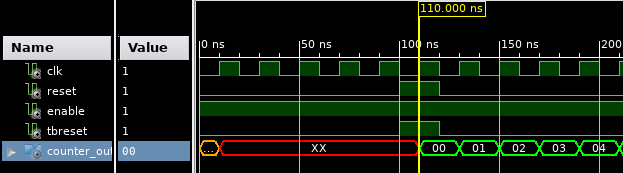
Now, run the simulation.
ssim counter_tb.sc

Time    CLK     clk reset enable counter_out_oi
0       0       0   0     1      X
10      1       1   0     1      X
20      2       0   0     1      X
30      3       1   0     1      X
40      4       0   0     1      X
50      5       1   0     1      X
60      6       0   0     1      X
70      7       1   0     1      X
80      8       0   0     1      X
90      9       1   0     1      X
100     10      0   0     1      X
110     11      1   1     1      0
120     12      0   1     1      0
130     13      1   0     1      1
140     14      0   0     1      1
150     15      1   0     1      2
160     16      0   0     1      2
170     17      1   0     1      3
180     18      0   0     1      3
190     19      1   0     1      4
You can see that it is reset at 110ns and becomes 1 at 130ns.
You can see that the result is identical when compared with the output from other simulators.
Core Syntax
Logic Declaration
Logic and port declarations are simple. If the width can be inferred, it is automatically declared.
logic(data[8])        # 8-bit logic declaration

other <= data         # 'other' infers width from 'data' — automatic declaration
a <= INT(0x55, 16)    # 'a' is automatically declared as 16-bit and then assigned
The last line is converted as follows:
signal a : std_logic_vector(15 downto 0);
a <= x"0055";
Conditional Assignment
The same syntax is used for both combinational and sequential logic.
# combinational
out <= (value_if_true, condition, value_if_false)

# sequential — the syntax is identical
with sequence(clk) :
    out <= (value_if_true, condition, value_if_false)
Module Connection
Connect modules directly without component declarations.
imodule('sub.sc', clk=clk, reset=reset, data=data)Reading Outports Internally (VHDL)
In VHDL, outports cannot be read internally. SCode handles this automatically.
outport(count[4])

with sequence(clk) :
    count <= count + 1    # You can read the outport directly
-- Conversion result: automatically creates and manages internal signals
signal count_oi : std_logic_vector(3 downto 0);
process(clk)
begin
if rising_edge(clk) then
count_oi <= std_logic_vector(unsigned(count_oi) + 1);
end if;
end process;
count <= count_oi;Creating Testbenches
testbench('counter.sc')
tb_clock(clk)
reset <= tb_reset()
enable <= 1
A single testbench() line declares all ports of ‘counter.sc’ as logic and handles the module connection.